- Several minor bug fixes (not visible to to users)
- Installation can now be repaired from Settings window
- Please upgrade now.
Author: Jason Kim
-
0.5.1 Release Notes
-
0.4.0 Release Notes
Welcome to the 0.4.0 Release.
The very first thing that Ysobel.AI will do when you run it for the first time is to display a quick welcome dialog, which will remind you that your PIN (for securing YOUR DATABASE) must be both memorable AND secure.
Please refer to this post for some ideas about choosing a secure password that is memorable. (It’s actually easier than you might think!)
So what are selection sets? Please watch our demo video to find out!
In short, Selection sets are arbitrary named groups (named by you!) of anything. By anything, we really mean anything. But to keep things simple, the most basic form of a selection set is a group of documents that have some meaning for you.
It’s sort of like having bookmarks. In the old days, bookmarks were visible items you place inside a physical book to remind you where to resume your reading. In the Ysobel.AI era, bookmarks are superseded by Selections, which are a grouping of anything that you can use to apply an action to (such as asking Ysobel a question about them).
Selection sets have names as well as its birthday, as well as additional metadata of arbitrary type and size that YOU choose to add to them. In otherwise, Ysobel.AI selection sets are a tool for YOU to design and implement YOUR OWN DOCUMENT INTELLIGENCE/ANALYSIS FRAMEWORK.
Known Bugs for 0.4.0
- The query bar freezes after deleting an indexed document from the database. Workaround is to restart the app.
- Lack of notifications about the status of AI engine startup
- On a PC, it might take up to 30 seconds for the AI Engine to load after the GUI starts. The AI engine DOES publish log messages, but it still takes time for the first log message to appear. Please be patient!
- Mac version is not there (YET!)
-
How to create a secure password that is memorable!
This is harder than it sounds. It really is.
But its not impossible.
First, come up with a story about you, that only you will know. This story should be anywhere between 4 to 30 words or so. You can make them longer or shorter, but there are risks in either direction.
Take the first letter of each word of *your* story. If you want to be advanced, you can include punctuation marks!
For example if your story is:
“Adventurous denizens crow about their success! Always and always!”
The password will be “Adcats!Aaa!”
You can vary the formula (e.g. alternating first and last letters, etc.. The key thing is to link the password to a story that only you will know.
-
A New Demo Video!
Hi everyone, we’re getting close to our next awesome release.
It will be our first with the preview of our GUI Patent in usable form.
The first minute the video is what you can expect after you download and install our software.
To save time, we skipped the secondary installation phase, and added some documents to the app.
The remaining 5 or so minutes is a quick overview of how to use our GUI to work with your documents.
If you know how to use a web browser, you have 100% of the expertise needed to use our software effectively!
Things are getting exciting!
-
Preview of our next exciting Release!
Hi everyone!
We have been very busy beavers the last few weeks adding in exciting GUI usability mods to enable even the novice to quickly organize his documents into coherent sets!
Without further ado, here goes!
This video shows you a taste of the power of composing filters and persistent selection sets to quickly whittle down a massive list of documents to a manageable number.
It doesn’t matter how many documents you have!
With our patented technology at your fingertips, you’ll be able to handle just a dozen, or a hundred or a thousand or even a million (or more!) with ease!
We hope you’ll be as excited as we are in bringing this feature live!
We make AI easy to apply — in your office, in your home — wherever you may be doing work!
-
v0.3.5 Release Notes
- Mac version now working
- Auto-update now functioning
- Linux AppImage still needs manual restart after update
-
MacOs version “damaged??” Say it ain’t so!
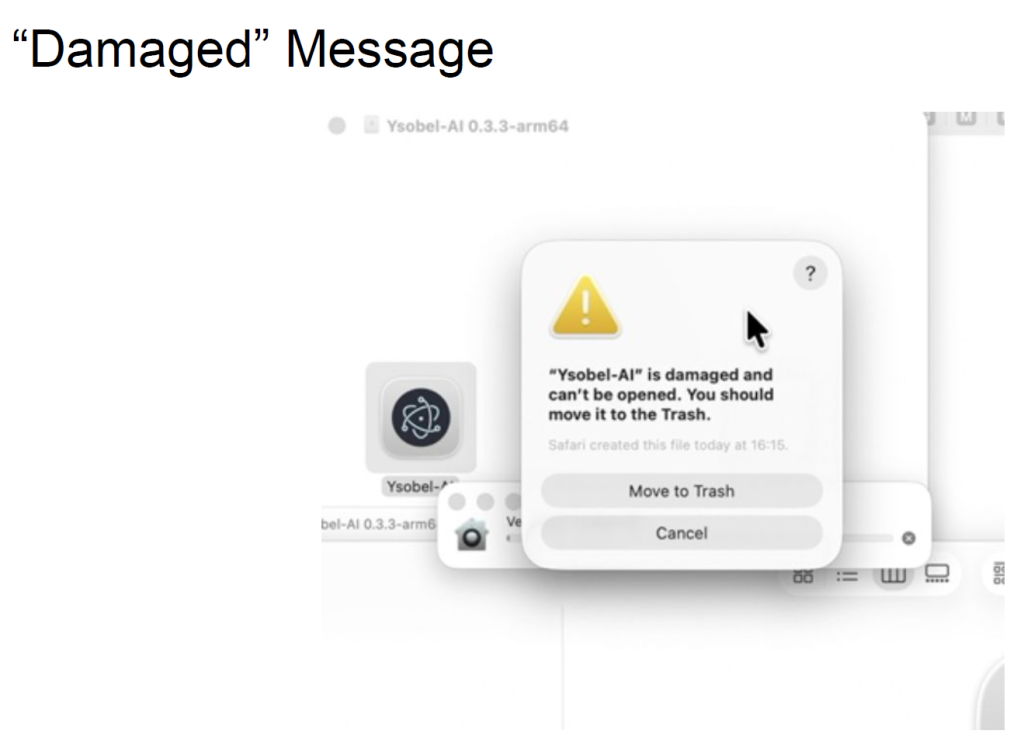
Hi everyone.
Apologies for the trouble with the Mac version of our app.
It has to do with the signature of the App not matching properly. Until we get that straightened out with Apple (officially, that is) here is what you can do.
First, download the .dmg as per normal
HERE is the download link for the Mac version of Ysobel.AI
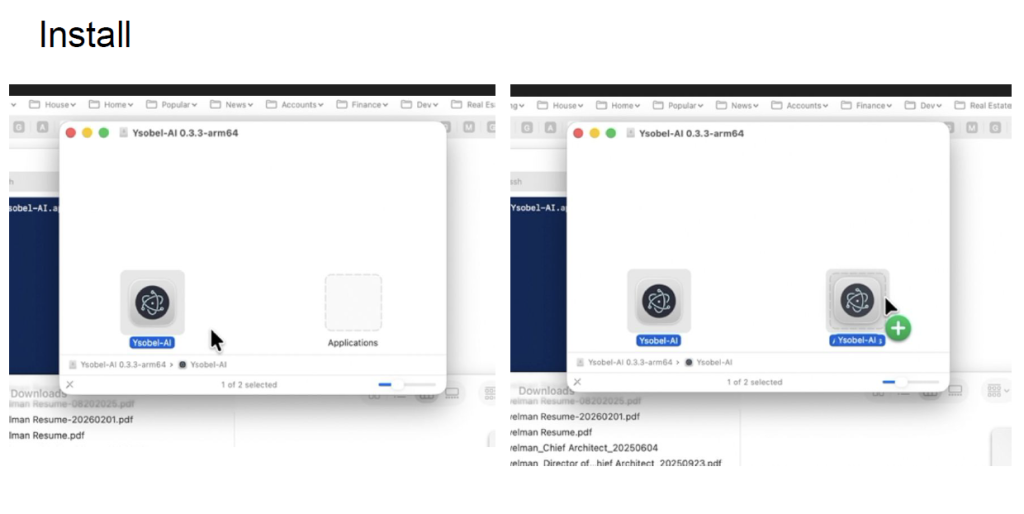
When you click on the app, you will probably see
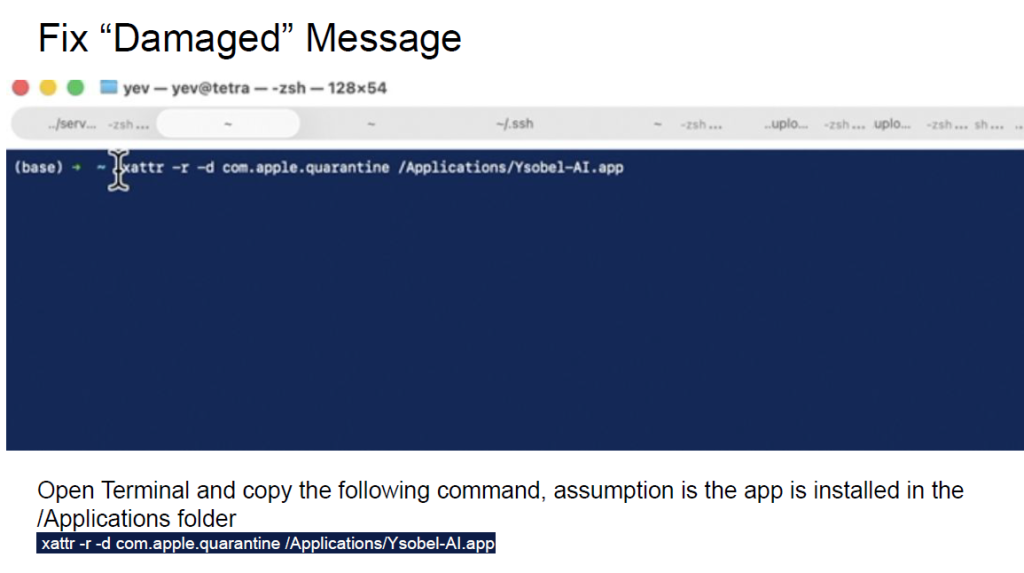
Here is how you can fix it:
Open a shell and run the following command:
xattr -r -d com.apple.quarantine /Applications/Ysobel-AI.app
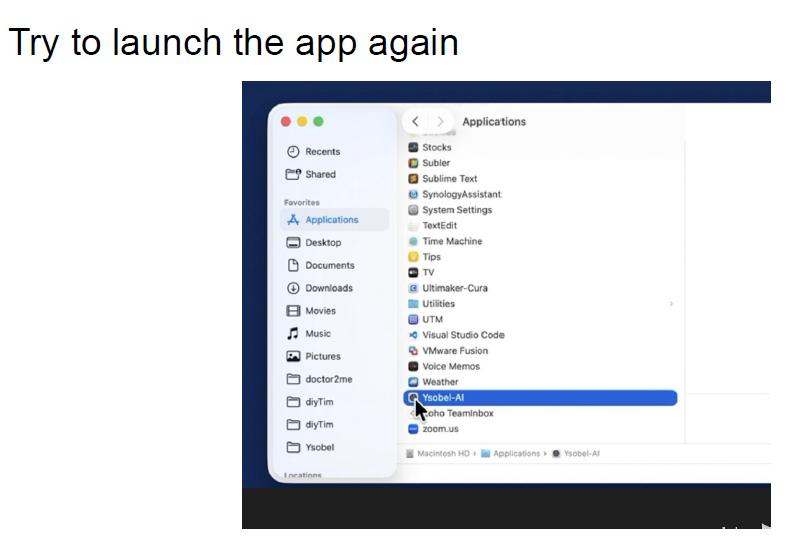
And try to launch the app again
Here is a PDF of these instructions
-
The consequences of hardware failure on software deployment are many and unexpected.
Sorry for the glitches everyone.
We had a hardware failure on our server earlier this week. During the recovery process, we thought we successfully re-deployed our license server to the cloud, but didn’t realize that the deployment environments were not the same.
Thus we’re troubleshooting a long stream of unexpected failures after another.
Thanks for your understanding.
The diagnosis is still ongoing. Sorry for the mess.
-
Our license server is undergoing maintenance right now
Until the issues are resolved, you may experience glitches when Ysobel.AI is trying to verify your license.
Sorry for the mess.
-
Such a long long slog
Our first public-ready BETA trial VERSION IS READY!
The version is 0.3.2, and you can access them HERE